Happy Face
So we've come a long way. But I think there's a small
chance you'll want to make a game with better graphics
than Pong. It's just a theory. So today, we get
our "player" graphics mojo working.
Doing player graphics isn't that much more difficult
than using the missile we've been using for the last few demos.
The trick is that instead of a single on/off boolean value
that says if the Atari is drawing the missile, we set a full
byte, 8 bits, that make up the graphics for the player for that
line. So not only do we have to count the lines and turn
the player on or off, but we have to load GRP0 (or GRP1 for
the second player) with the correct eight bit value:
1 means the pixel in that location (read left to right,
like you'd expect) is on, 0 means it's off. So #%10001101
would have one pixel on, three off, two on, one off, and one
on.
You change the color of the player the same you do for a missile,
by setting COLUMP0 or COLUMP1 (the same register sets the color
for a player and its associated missile.) Some of the fancier
programs change the color of a player graphic beteen each scanline, given
that distinctive horizontal-band colorization effect that the
Atari is known for. (At least for people who pay attention to that
kind of thing.) Also like Missiles, there are tricks to duplicate the player
or make it wider...I'll let you look that up in the Stella guide.
I guess we might as well talk about color, 'cause I've been faking it up to now.
(Unlike the rest of this fine tutorial, of course, which is completely unfaked.)
B.Watson provides us with this handy chart:
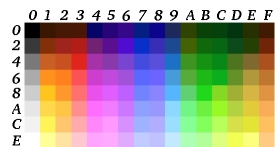
Colors are most easily thought of as a two digit hex number.
The left digit is the color, the right bit is the luminosity, or brightness.
So to use this chart, find the hex digit for the color column you want,
that's the first digit, then pick the luminosity going down, that's the right
digit. So $76 is a medium blue. $0E is white (the rightmost bit of the
luminosity doesn't matter, so $0E is the same as $0F) $D2 is a dark green.
(This is all aproximate of course; different emulators and different
TVs will display things differently, and this chart is only
for NTSC TVs, not that crazy European PAL stuff)
One somewhat confusing thing is that (usually) Atari graphics are stored upsidedown
in the program listing. This is because usually you have a positive number keeping
track of how many lines are left to go as you're drawing the player, and this
number is decreasing as you go through the scanlines. Combine that with the fact
that the memory offset operation adds a number to the base memory location
for the graphics, and it usually ends up making more sense to store the things
bottom to top. You'll see in today's example.
One member of that tiny group "things the Atari does
to make your life easier" is that if you set bit D3 of REFP0
(or REFP1) to 1, it gives you the mirror image of the player,
so you don't have to have a seperate copy of the graphics
if you want to have a thing moving the other way.
Another even more important thing "to make your life easier"
is that the Atari can tell if any 2 of its 6 items (players (P),
missiles (M), ball (BL), and playfield (PF)) have collided. There are 15
1-bit latches. (Do the math...the playfield could've hit
any of the other 5 object, the ball could've hit any of the
other 4 objects (we've already counted the playfield/ball
collision) etc.... 5+4+3+2+1 = 15.)
Here is the relevant extra from the Stella guide:
| 6-bit Address | Address Name | 7 | 6 | 5 | 4 | 3 | 2 | 1 | 0 | Function | D7 | D6 |
| 0 | CXM0P | 1 | 1 | . | . | . | . | . | . | read collision | M0 P1 | M0 P0 |
| 1 | CXM1P | 1 | 1 | . | . | . | . | . | . | read collision | M1 P0 | M1 P1 |
| 2 | CXP0FB | 1 | 1 | . | . | . | . | . | . | read collision | P0 PF | P0 BL |
| 3 | CXP1FB | 1 | 1 | . | . | . | . | . | . | read collision | P1 PF | P1 BL |
| 4 | CXM0FB | 1 | 1 | . | . | . | . | . | . | read collision | M0 PF | M0 BL |
| 5 | CXM1FB | 1 | 1 | . | . | . | . | . | . | read collision | M1 PF | M1 BL |
| 6 | CXBLPF | 1 | . | . | . | . | . | . | . | read collision | BL PF | unused |
| 7 | CXPPMM | 1 | 1 | . | . | . | . | . | . | read collision | P0 P1 | M0 M1 |
What this says is if, say, Missile 1 has hit Player 0, then D7 of CXM1P will be
1. If the two missiles collide, then D6 of CXPPMM will be 1. There's one final
trick which seems confusing at first but is secretly useful: when two things collide,
that latch stays set with a 1 even if they then move apart. Latches stay set until
you hit the register CXCLR, which resets all the latches to zero. So that way,
you don't have to check for collisions every time if you don't want to. In practice,
most games will read all the collisions they care about and then hit CXCLR every
time screen frame, but it's nice to have the option.
Animation is fairly simple...every time you want to show
the next position of the guy's animation, just load the graphic
from a different memory location that has the next "frame" of animation.
So, I think we're ready for todays example. We'll move a Happy Face player
around the screen with the joystick. The code will be based on last lesson's
"moving dot", changes in red.
To liven things up, I'll throw the sweeping thin red line back
in (but using missile 1 instead of missile 0) Every time it hits the
player, the screen background will change to a value reflecting the vertical
position of the happy face. We'll use a non-symmetrical happy face, giving
a slight 3D effect, as well as letting us tell which way the player is facing.
; move a happy face with the joystick by Kirk Israel
; (with a can't'dodge'em line sweeping across the screen)

	processor 6502
	include vcs.h
	org $F000

YPosFromBot = $80;
VisiblePlayerLine = $81;

;generic start up stuff...
Start
	SEI
	CLD
	LDX #$FF
	TXS
	LDA #0
ClearMem
	STA 0,X
	DEX
	BNE ClearMem

	LDA #$00   ;start with a black background
	STA COLUBK
	LDA #$1C   ;lets go for bright yellow, the traditional color for happyfaces
	STA COLUP0
;Setting some variables...
	LDA #80
	STA YPosFromBot	;Initial Y Position

;; Let's set up the sweeping line. as Missile 1


	LDA #2
	STA ENAM1  ;enable it
	LDA #33
	STA COLUP1 ;color it

	LDA #$20
	STA NUSIZ1	;make it quadwidth (not so thin, that)


	LDA #$F0	; -1 in the left nibble
	STA HMM1	; of HMM1 sets it to moving


;VSYNC time
MainLoop
	LDA #2
	STA VSYNC
	STA WSYNC
	STA WSYNC
	STA WSYNC
	LDA #43
	STA TIM64T
	LDA #0
	STA VSYNC


;Main Computations; check down, up, left, right
;general idea is to do a BIT compare to see if
;a certain direction is pressed, and skip the value
;change if so

;
;Not the most effecient code, but gets the job done,
;including diagonal movement
;

; for up and down, we INC or DEC
; the Y Position

	LDA #%00010000	;Down?
	BIT SWCHA
	BNE SkipMoveDown
	INC YPosFromBot
SkipMoveDown

	LDA #%00100000	;Up?
	BIT SWCHA
	BNE SkipMoveUp
	DEC YPosFromBot
SkipMoveUp

; for left and right, we're gonna
; set the horizontal speed, and then do
; a single HMOVE.  We'll use X to hold the
; horizontal speed, then store it in the
; appropriate register


;assum horiz speed will be zero
	LDX #0

	LDA #%01000000	;Left?
	BIT SWCHA
	BNE SkipMoveLeft
	LDX #$10	;a 1 in the left nibble means go left

;; moving left, so we need the mirror image
	LDA #%00001000   ;a 1 in D3 of REFP0 says make it mirror
	STA REFP0

SkipMoveLeft
	LDA #%10000000	;Right?
	BIT SWCHA
	BNE SkipMoveRight
	LDX #$F0	;a -1 in the left nibble means go right...

;; moving right, cancel any mirrorimage
	LDA #%00000000
	STA REFP0

SkipMoveRight


	STX HMP0	;set the move for player 0, not the missile like last time...


; see if player and missile collide, and change the background color if so

	;just a review...comparisons of numbers always seem a little backwards to me,
	;since it's easier to load up the accumulator with the test value, and then
	;compare that value to what's in the register we're interested.
	;in this case, we want to see if D7 of CXM1P (meaning Player 0 hit
	; missile 1) is on. So we put 10000000 into the Accumulator,
	;then use BIT to compare it to the value in CXM1P

	LDA #%10000000
	BIT CXM1P
	BEQ NoCollision	;skip if not hitting...
	LDA YPosFromBot	;must be a hit! load in the YPos...
	STA COLUBK	;and store as the bgcolor
NoCollision
	STA CXCLR	;reset the collision detection for next time


WaitForVblankEnd
	LDA INTIM
	BNE WaitForVblankEnd
	LDY #191


	STA WSYNC
	STA HMOVE

	STA VBLANK


;main scanline loop...


ScanLoop
	STA WSYNC

; here the idea is that VisiblePlayerLine
; is zero if the line isn't being drawn now,
; otherwise it's however many lines we have to go

CheckActivatePlayer
	CPY YPosFromBot
	BNE SkipActivatePlayer
	LDA #8
	STA VisiblePlayerLine
SkipActivatePlayer


;set player graphic to all zeros for this line, and then see if
;we need to load it with graphic data
	LDA #0
	STA GRP0

;
;if the VisiblePlayerLine is non zero,
;we're drawing it now!
;
	LDX VisiblePlayerLine	;check the visible player line...
	BEQ FinishPlayer		;skip the drawing if its zero...
IsPlayerOn
	LDA BigHeadGraphic-1,X	;otherwise, load the correct line from BigHeadGraphic
				;section below... it's off by 1 though, since at zero
				;we stop drawing
	STA GRP0		;put that line as player graphic
	DEC VisiblePlayerLine 	;and decrement the line count
FinishPlayer


	DEY
	BNE ScanLoop

	LDA #2
	STA WSYNC
	STA VBLANK
	LDX #30
OverScanWait
	STA WSYNC
	DEX
	BNE OverScanWait
	JMP  MainLoop


; here's the actual graphic! If you squint you can see its
; upsidedown smiling self
BigHeadGraphic
	.byte #%00111100
	.byte #%01111110
	.byte #%11000001
	.byte #%10111111
	.byte #%11111111
	.byte #%11101011
	.byte #%01111110
	.byte #%00111100

	org $FFFC
	.word Start
	.word Start
Yikes, with all that joystick testing and graphics crap, our code listings are getting a bit long!
Hopefully you're still able to follow along. And next lesson, I'll tell you why this kernal sucks...
Next:PlayerBufferStuffer